Local Processing
Password verification is designed for your device. Client update and membership network behavior require release-specific disclosure.
A desktop wallet password recovery tool that uses your own password dictionaries to help recover access to supported encrypted wallets.
8 threadsA straightforward workflow with flexible password dictionary management and configurable processing options.
Start with clarity. Inspect the wallet file and review the format and encryption information the client can identify.
Explore featureBring your own candidates. Import one or more TXT dictionaries and keep file counts, password entries, and import status in view.
Explore featureChoose the processing option that fits your task. Configure CPU threads or use a compatible GPU backend where supported.
Explore featureStay informed from first attempt to final result. Follow attempted candidates, overall progress, elapsed time, and remaining-time estimates.
Explore feature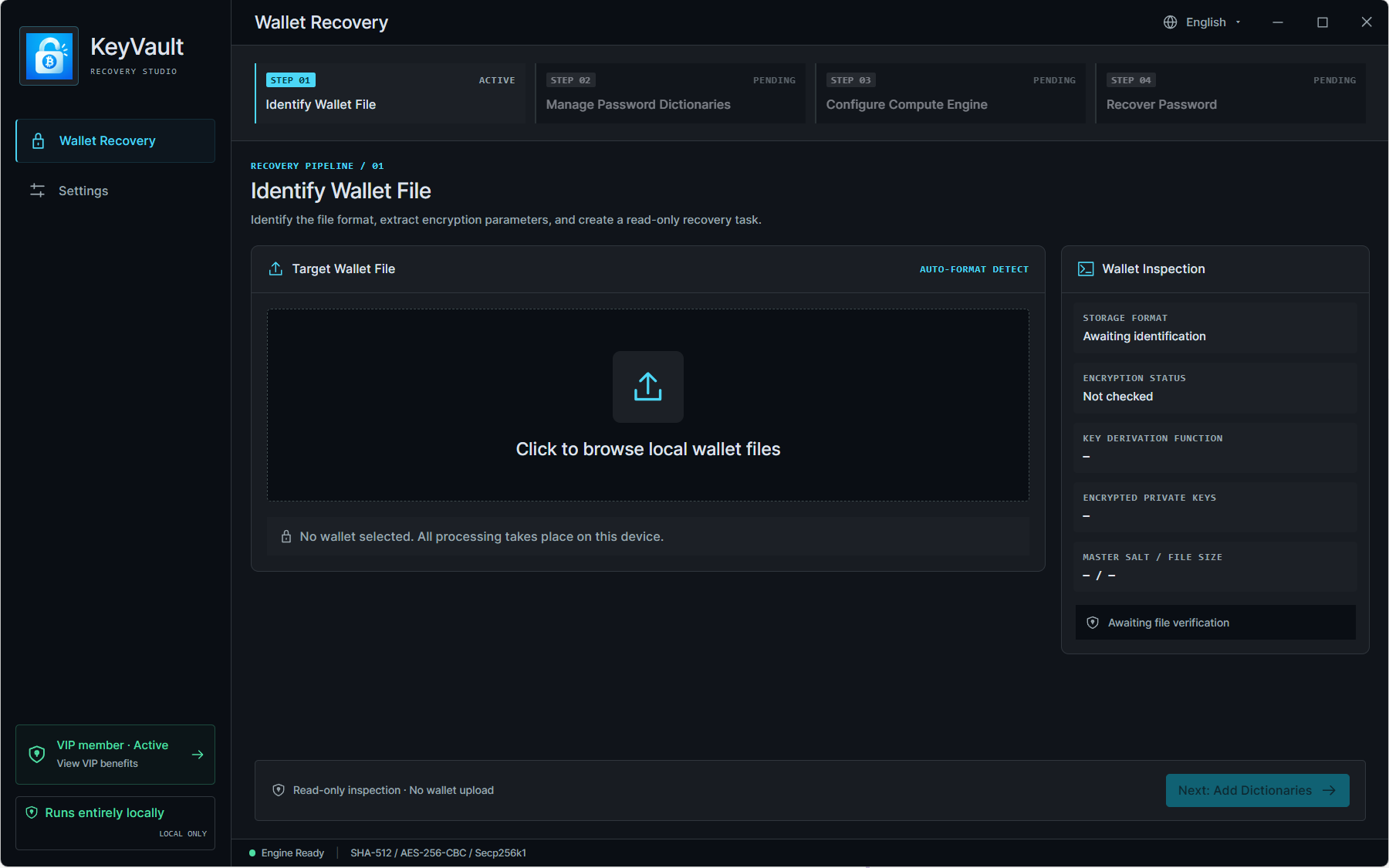
From Bitcoin Core to multi-chain wallets, find the declared support scope before starting your task.
Compatibility depends on wallet software, file version, encryption method, and recovery implementation.
A recovery workflow built around your own files and your own decisions. Sensitive wallet data has no place in a website form.
Read our privacy disclosureNever share your recovery phrase, private keys, or recovered wallet password with anyone.
Password verification is designed for your device. Client update and membership network behavior require release-specific disclosure.
You choose and manage your candidate passwords. This website never asks you to upload a dictionary.
Follow task status and measured progress. No invented success rates, guaranteed passwords, or fixed-speed promises.
You do not need to transfer funds or share recovery phrases, private keys, or wallet passwords with us.
Choose a processing path that fits the wallet algorithm and your machine. Compare options without made-up benchmarks.
Understand compatibilityConfigurable local worker threads.
Illustration only. Actual availability and performance depend on your release, algorithm, and hardware.
Download version 1.2.9 for Windows, Linux, or macOS.
For macOS, select the build that matches your Intel or Apple Silicon chip.
366dd4f1a59901516b0a3350c936e53c89873049f0794d21b1073b800705a745Code-signing and notarization details have not been supplied. A checksum verifies file integrity, not publisher identity.
664068fe6e69c2a2740dd1591acf09bc2ac083775453d3693c96729831d050a0Code-signing and notarization details have not been supplied. A checksum verifies file integrity, not publisher identity.
Apple menu > About This Mac: select Intel for an Intel processor, or Apple Silicon for an Apple M-series chip (M1, M2, M3, and later).
Both Mac builds are available. Select your chip to see the matching download and checksum.
No guarantees. No hidden assumptions. Understand the recovery process and its limits.
Visit SupportIt tests candidate passwords from dictionaries you supply against a supported encrypted wallet file. It helps restore access to a wallet you own or are explicitly authorized to recover. Password recovery is different from restoring missing or damaged wallet data.
The compatibility directory lists the wallets declared supported by the product owner, including Bitcoin Core. Exact file versions and encryption methods still matter. A listed wallet name is not a guarantee that every export or hardware-device format is supported.
This website does not accept wallet files, dictionaries, passwords, keys, or seed phrases. Wallet password verification is designed to run on your device. The supplied application interface also includes membership features; update checks, license verification, and crash-reporting behavior have not been independently confirmed. Review the privacy information included with your client release.
No. Recovery requires a supported algorithm and a matching password among the candidates actually tested. No tool can guarantee recovery of every password or bypass every wallet protection mechanism.
A plain-text TXT file containing candidate passwords, one per line. Prepare it locally from passwords or patterns you remember. Do not send it to support or upload it to this website.
Yes, the supplied interface supports multiple TXT / UTF-8 files. It states that blank lines and surrounding spaces are preserved, with no deduplication or mutations; duplicate lines count as separate attempts. Review import counts and confirm these rules in your installed release.
The provided interface shows a Hashcat GPU option gated by VIP membership. It requires a compatible GPU, driver, installed Hashcat executable, supported wallet algorithm, and suitable client build. Device-specific password-length limits may apply; rejected candidates can require CPU processing.
Time depends on the wallet algorithm, hardware, processing parameters, and number of candidates. A larger dictionary is not necessarily more efficient. Remaining-time estimates are based on measured progress and can change; no fixed speed or completion time is promised.
A completed search without a match means none of the successfully tested candidates matched. Review the wallet compatibility, import status, and candidates. Keep your original wallet backup; do not overwrite or delete it.
Downloads are available for Windows x64, Linux x86_64, and macOS. On macOS, open Apple menu > About This Mac: choose the Intel build for an Intel processor, or the Apple Silicon ARM64 build for an Apple M-series chip.
Calculate its SHA-256 locally and compare all 64 hexadecimal characters with the published value. Verify the code signature or detached signature using the release instructions. A checksum alone does not prove publisher identity.
The application main feature is free to use. But includes some VIP features.
The advertised workflow is encrypted-wallet password recovery using candidate dictionaries. It does not promise reconstruction of missing seed phrases, private keys, or lost wallet files. Never share those secrets with anyone.
Use the Support page to prepare a sanitized report with the client version, OS, wallet software/version, and error description. Do not attach a real wallet, password dictionary, recovery phrase, private key, or recovered password. Contact delivery becomes available when an official support address is configured.
Download the desktop application and use your own password dictionary to get started.